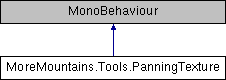
Use this class on a sprite or mesh to have its texture pan according to the specified speed You can also force a sorting layer name
More...
|
| Vector2 | Speed = new Vector2(10,10) |
| | the speed at which the texture pans More...
|
| |
| string | SortingLayerName = "Above" |
| | the name of the sorting layer to render the texture at More...
|
| |
|
| virtual void | Start () |
| | On start, grabs the renderer and/or raw image More...
|
| |
| virtual void | Update () |
| | On update, moves the texture around according to the specified speed More...
|
| |
Use this class on a sprite or mesh to have its texture pan according to the specified speed You can also force a sorting layer name
◆ Start()
| virtual void MoreMountains.Tools.PanningTexture.Start |
( |
| ) |
|
|
protectedvirtual |
On start, grabs the renderer and/or raw image
◆ Update()
| virtual void MoreMountains.Tools.PanningTexture.Update |
( |
| ) |
|
|
protectedvirtual |
On update, moves the texture around according to the specified speed
◆ _position
| Vector2 MoreMountains.Tools.PanningTexture._position = Vector2.zero |
|
protected |
◆ _rawImage
| RawImage MoreMountains.Tools.PanningTexture._rawImage |
|
protected |
◆ _renderer
| Renderer MoreMountains.Tools.PanningTexture._renderer |
|
protected |
◆ SortingLayerName
| string MoreMountains.Tools.PanningTexture.SortingLayerName = "Above" |
the name of the sorting layer to render the texture at
◆ Speed
| Vector2 MoreMountains.Tools.PanningTexture.Speed = new Vector2(10,10) |
the speed at which the texture pans
The documentation for this class was generated from the following file:
- F:/Github/Store/MMFeedbacksStore/Assets/MMFeedbacks/MMTools/Tools/VFX/Scripts/PanningTexture.cs

 1.8.18